TeamSnap ONE
- 4.7
- Rating
- 100.00K
- Installs
- Free
- Price

 Analysis by App-foxy
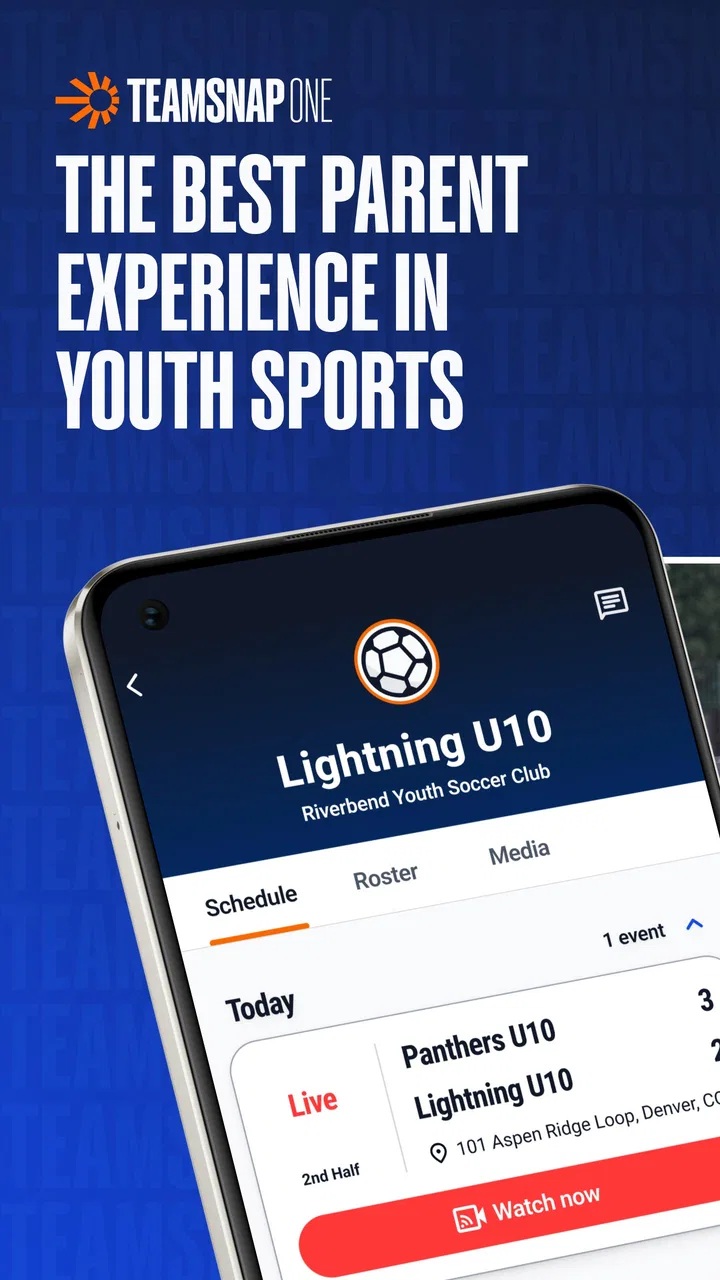
TeamSnap ONE is an unusual sports app because it is not presented as a broad, open service that anyone can immediately explore. It is an invite-only experience from TeamSnap’s innovation lab, which changes the way I judge it. Instead of asking whether it replaces every sports tool, I look at whether it feels worthwhile for people who have actually been invited and whether it handles the practical pressure of team-related use without creating extra work.
My first impression is that this is an app for a defined group rather than a general sports audience. If a coach, club, organizer, or another team contact has directed you toward it, the invitation is likely the starting point for everything that follows. If you simply want a sports tracker, score companion, training guide, or public community app, this is probably not the right place to begin. The invite-only design is not a small detail; it sets expectations before you even consider speed, stability, or daily usefulness.
TeamSnap, Inc. is the developer, and the app sits in the sports category. It is free to install, rated for Everyone, and requires Android 10 or later. The current release is 1.16.0+production-release, while the app was released on June 10, 2025. Those details make it feel like a relatively new product in an experimental phase, rather than a mature utility with years of visible history behind it.
You May Also Like

 Pandora - Music & Podcasts
Pandora’s Music Is Easy to Start, but Harder to Recover
Pandora’s strength is its low-effort path from a seed to a station. Its weak spot is how much confidence it asks you to place in connection, setup, and quiet recovery.

 AccuWeather: Weather Radar
AccuWeather Review: A Quick, Clear Forecast for Everyday Decisions
For everyday plans, the best forecast is the one you can understand quickly. AccuWeather makes rain timing, radar, and local conditions easy to act on, with a few trade-offs.

 Hill Climb Racing
Why Hill Climb Racing Still Turns Crashes Into One More Run
A tiny car, a bumpy hill and one more upgrade: Hill Climb Racing keeps resurfacing because its simple chaos makes every near-miss feel personal.

 AliExpress - Shopping App
AliExpress Makes Global Shopping Feel Personal, but Shoppers Bear the Risk
AliExpress turns a global marketplace into a pocket-sized discovery engine. Its reach is useful, its shopping loop compelling, and its trade-offs easy to miss.

 Lords Mobile: Kingdom Wars
Lords Mobile Is a Kingdom-Building Routine, Not a Quick Match
A case-by-case verdict on the building, battles, device demands, and social commitments that make Lords Mobile rewarding for some players and exhausting for others.

 PDF Scanner app - TapScanner
TapScanner Makes Paperwork Easier to Capture, Check, and Share
TapScanner makes scanning with a phone feel less like a rescue operation and more like a dependable step in getting work done. Its capture tools are useful, though not flawless.
More From Our News Desk
View All News


How TeamSnap ONE feels during everyday use
I find that the invite-only setup makes trust less about broad promises and more about the specific group that brings you in. In this section, I’d focus on the everyday choices that shape whether the app feels comfortable to use, while keeping expectations grounded in what a member can actually observe. That leads naturally to the more practical question of which controls are visible once you’re inside.
Speed expectations for an invite-only sports app
When I open an app tied to a team or organized activity, I care less about flashy presentation and more about whether I can get to the relevant information quickly. A sports app often gets used at awkward moments: while leaving home, standing near a field, waiting for a ride, or checking something shortly before an activity begins. TeamSnap ONE makes sense in that context only if its focused access model keeps the experience direct.
The narrow audience can be an advantage. An invite-only product does not need to behave like a public sports network filled with unrelated content. In principle, that should help keep attention on the experience connected to the invitation. I would still avoid assuming that a smaller scope automatically means faster performance. The app is new enough that the quality of the experience may depend on how polished the particular release is and how smoothly the invitation process works for your group.
My practical advice is to install it before the day you need it. Do not wait until you are already outside, short on time, or dealing with a weak connection. That simple habit is especially useful with a new app whose main value begins after access has been granted. It also gives you a chance to check whether your device meets the Android requirement and whether the invitation leads you into the expected experience.
The most important speed tip is to complete the first access step while you have time to troubleshoot. An invite-only app has a different kind of friction from a normal sports download: the issue may not be loading a page, but knowing whether you are using the right invitation, account path, or entry point. Preparing early prevents that uncertainty from becoming a sideline problem.
What happens during heavy-use moments
The demanding moments for TeamSnap ONE are likely to be social and situational rather than graphics-heavy. A person may open it when several members of a group are doing the same thing, when an organizer has just shared something important, or when many users are checking in around an activity. I cannot treat the app as a performance showcase, because its purpose is tied to an invited experience rather than intensive visual processing.
That distinction matters when deciding what device to use. If your main concern is smooth gaming, video editing, or another task that pushes a phone hard, this sports app is not designed to be evaluated by those standards. For TeamSnap ONE, the more meaningful test is whether it remains comfortable when opened repeatedly throughout a busy day and whether returning to it feels straightforward after switching to messages, maps, a camera, or another sports tool.
I would also avoid making it the only place where you keep essential arrangements until you understand how your group uses it. For example, if a coach sends an important change through the invited experience, I would read it there but keep the time and location in my normal calendar or notes as a backup. That is not a criticism of one specific feature; it is a sensible workflow for a new, restricted-access app that may be central to one group but unfamiliar to everyone else.
A useful trade-off appears here. The app may feel cleaner than a large public platform because you are not navigating unrelated sports content, yet that same focus can make it less useful outside the invited context. A parent managing several children, a player involved in multiple organizations, or an organizer who communicates across different platforms may still need other tools alongside it. TeamSnap ONE should be viewed as a focused layer, not automatically as the entire sports-management setup.
Reliability, recovery, and the limits of a new release
Reliability is more than avoiding crashes. For an invite-only sports app, I also want a clear path back into the experience after closing it, changing networks, restarting the phone, or returning after several days away. A tool connected to a group has to be understandable when I am not using it constantly. If I need to rediscover how access works each time, the convenience disappears.
The app’s release date and current version suggest that it is still early in its public life. That does not mean it is unstable, but it does mean I would keep expectations realistic. Newer software can improve quickly, yet it may also have rough edges that become visible only when different people use it with different devices and habits. I would update it when an update is available through the normal app channel and avoid judging the whole concept from one awkward first session.
Recovery is particularly important if you change phones or reinstall the app. Before doing that, I would make sure I still have access to the invitation or know who in the group can help me regain entry. With a conventional sports app, you can often browse again immediately after reinstalling. With an invite-only product, access is part of the product experience, so losing the original route into the app can be more disruptive.
Another practical safeguard is to keep communication open with the person or organization that invited you. If the app does not behave as expected, the organizer may be able to clarify whether the issue is related to the invitation rather than your phone. This is one of the less obvious consequences of the model: support may be partly social and organizational, not only technical.
Device constraints and resource expectations
TeamSnap ONE supports Android devices running Android 10 or newer. That is a meaningful boundary for anyone using an older phone or holding onto an older operating system for compatibility reasons. Before recommending it to a family member or teammate, I would check the Android version rather than assuming that any Android handset can install it.
The minimum operating-system requirement also affects group planning. If a team includes children using older devices, parents sharing phones, or members who do not update regularly, not everyone may have the same path into the experience. The app’s Everyone age rating makes it broadly suitable from an age-classification perspective, but that does not remove the practical device requirement. Age accessibility and technical accessibility are different questions.
I would not expect TeamSnap ONE to be a major resource burden simply because it belongs to the sports category, but I also would not invent battery or memory claims. The sensible approach is to observe your own phone during repeated use. If you are switching between navigation, messaging, photography, and this app around an event, the combined workload matters more than the app category alone.
For a lower-end or older compatible phone, keeping the system updated, closing genuinely unnecessary background tasks, and leaving some free storage can make everyday use more comfortable. Those are general device habits, but they are especially useful when an app is still developing and you want to separate phone limitations from app behavior. If the phone already struggles with ordinary applications, TeamSnap ONE should not be expected to transform that experience.
Who will get the most from it?
The clearest audience is someone who has received a direct invitation and wants to participate in the experience connected to that invitation. That might include a player, parent, volunteer, coach, or another member of an organized sports group. The app’s value is likely to come from belonging to the right circle, not from downloading it alone.
I can also see a practical use for a family that wants a dedicated place for one sports commitment without opening a broad public platform. The restricted entry may feel reassuring for people who prefer a group-oriented environment instead of a feed designed for discovery. At the same time, that benefit depends on the invited experience being relevant and active for your particular group.
I would skip it if you are looking for independent sports content, personal training plans, live public scores, a running log, or a general fitness dashboard. Those needs call for apps built around open discovery or individual tracking. TeamSnap ONE is not an obvious substitute for those categories simply because it has a sports label.
I would also hesitate if your group already has a dependable system that everyone understands and nobody wants to change. Adding another app can create duplicated announcements, missed updates, and confusion about which channel is authoritative. The best time to adopt it is when the inviting organization has a clear reason for using it and can explain what should happen inside the app versus elsewhere.
A realistic day with the app
Imagine that I am a parent whose child has been invited into a team-related experience. I install the app at home on a compatible Android phone, open the invitation, and spend a few minutes confirming that I can return to the same place after closing it. Later, before leaving for an activity, I check the app rather than trying to complete the setup in a parking lot. I then keep the key time and location visible in my calendar so that navigation and scheduling do not depend on remembering a single app.
During the activity, I would use TeamSnap ONE for the invited experience itself and avoid constantly refreshing it without a reason. If I need directions, I would use a maps app; if I need to contact another parent directly, I would use the communication method the group already relies on. Afterward, I would reopen the app once more to make sure returning to it is easy and to notice whether anything about the group’s workflow feels unclear.
This scenario highlights the app’s likely strength and its main limitation. It can provide a focused route into a specific sports context, but it does not automatically replace every surrounding tool. The best experience comes from assigning it one clear role instead of expecting it to become the calendar, map, messaging service, and personal sports tracker all at once.
How it compares with usual sports alternatives
Compared with an open sports app, TeamSnap ONE is more selective. A general fitness or score app usually lets you browse, search, or create a personal profile without waiting for an invitation. That makes those alternatives better for independent use. TeamSnap ONE is more appropriate when the relationship with a particular group is the reason you are installing it.
Compared with ordinary group chats, the app may offer a more intentional home for a sports-related experience, but a chat is often easier for spontaneous questions and direct replies. If your team already handles everything through a familiar messenger, the advantage of adding TeamSnap ONE needs to be clear. Otherwise, members may split attention between two places and miss something important.
Compared with a traditional team-management product, this app’s innovation-lab positioning suggests a different emphasis: it feels like an evolving experience rather than a complete, established administrative suite. That can be appealing to users who want to try something new, but less appealing to organizers who need predictable, comprehensive controls and a long-established routine.
The free installation lowers the barrier to trying it, although in-app purchases range from about ten dollars to around seventy dollars per item. I would therefore distinguish between downloading the app and committing to any paid element. Before spending money, I would make sure the invited experience is genuinely useful to my group, understand who is expected to pay, and confirm that the purchase supports a need rather than simply adding another layer to an already workable setup.
What the rating and install signals mean in practice
The app currently shows a 0.0 average rating and over ten thousand installs. I would read those figures cautiously rather than treating them as a verdict on quality. A new or restricted-access app can have limited public feedback because many people encounter it through a specific invitation, and a rating snapshot may not tell me how well it works for a particular organization.
For a potential user, the more useful question is whether the inviting group has a clear workflow. Ask who is expected to use it, what information belongs there, and what happens if someone cannot access it. Those answers will tell you more about your likely experience than a simple popularity signal. An app can be technically promising and still be a poor fit if nobody agrees on how to use it.
My performance verdict
I see TeamSnap ONE as a focused sports app with a deliberately narrow entry point. Its strongest case is an invited user who wants to participate in a particular TeamSnap innovation-lab experience and is willing to treat it as one part of a broader routine. The free price makes testing easier, while the Everyone rating keeps the audience broad in principle. Android 10 or newer remains the practical device gate.
My recommendation is conditional but positive: install it when a trusted sports organization has invited you and can explain its role. Set it up before an important activity, keep a backup for essential scheduling, and judge it by how easily you can return to the relevant experience during a busy day. I would not recommend downloading it randomly in the hope that it will function as a general sports companion.
TeamSnap ONE is worth trying for the right invitation, not for the name alone. Its early-release character, restricted access, and possible paid items mean that expectations should stay measured. For an invited player, parent, or organizer, it may become a useful focused channel. For someone seeking open-ended fitness, scores, training, or chat features, a more established alternative will probably be the better choice.
FAQs for TeamSnap ONE
01What is TeamSnap ONE, and how does it differ from the standard TeamSnap app?
TeamSnap ONE is an all-in-one solution designed for managing sports teams and organizations. Unlike the standard TeamSnap app, TeamSnap ONE integrates more advanced features like enhanced communication tools, scheduling, and registration processes, catering to both individual teams and larger leagues. It offers a more comprehensive management experience for coaches and administrators.
02Is TeamSnap ONE suitable for both small teams and large leagues?
Yes, TeamSnap ONE is designed to accommodate both small teams and large leagues. It offers scalable features that allow users to manage a single team or multiple teams within a league. The app's flexible tools and customizable options make it ideal for any size of sports organization, ensuring efficient management and communication.
03What features does TeamSnap ONE offer to improve team communication?
TeamSnap ONE enhances team communication through various features such as instant messaging, email notifications, and shared calendars. The app also supports real-time updates and alerts to keep everyone informed of schedule changes or important announcements, ensuring that team members and parents are always in the loop.
04How user-friendly is TeamSnap ONE for new users and tech novices?
TeamSnap ONE is designed with user-friendliness in mind, featuring an intuitive interface that is easy to navigate even for tech novices. The app provides clear instructions and support resources to help new users get started quickly. Its straightforward design ensures that even those with limited technical skills can manage their teams effectively.
05What are the subscription options for TeamSnap ONE, and are there any free features?
TeamSnap ONE offers several subscription plans to cater to different needs, ranging from basic to premium options. Each plan provides varying levels of access to features, with the basic plan often including essential tools for team management. While the app may offer a free trial or basic features at no cost, more advanced capabilities typically require a paid subscription.
Pros
- User-friendly interface for quick navigation.
- Comprehensive scheduling and reminders.
- Real-time updates keep everyone informed.
- Integrated chat for seamless communication.
- Supports multiple sports and teams.
Cons
- Premium features require subscription.
- Occasional sync issues reported.
- Limited offline functionality.
- Some users find notifications excessive.
- Initial setup can be time-consuming.

TeamSnap ONE
Gallery